TrueLane® by The Hartford – Help

What Is TrueLane?^

TrueLane is a voluntary program that lets you personalize your insurance based on your driving behaviors. The TrueLane app measures your driving and gives real-time feedback to help you drive safer. You’ll get up to 15%^ off select coverages (up to 10% in Florida and 12% in Vermont) if you sign up within 60 days of your new policy’s start date. You can earn up to 40%^ (30% in Vermont) off your renewal policy for safe driving. Riskier habits may result in a higher premium.^ TrueLane can only be applied to one policy.

Select a Topic

Eligibility and Enrollment

Who can sign up for TrueLane?

To sign up for TrueLane, you must:
 
  • Be a licensed driver listed on an auto policy with The Hartford.
  • Install, use, and update the app on your compatible smartphone. To work with the program, your phone will need sufficient cellular coverage, sensors that measure movement, and a data plan that can collect and transfer the data that TrueLane collects. You’ll also need to make sure you turn on the app permissions to send TrueLane data. The app works with most current smartphones.
  • Agree to receive text messages on your phone about the TrueLane Program. https://www.thehartford.com/truelane2-texting-terms-conditions
  • Make sure you and all enrolled drivers can receive messages about the program. Every TrueLane driver on your policy should have an active mobile phone number and an email address they check regularly.

Do all drivers on my policy have to sign up?

No, however, more enrolled drivers means a better chance to personalize your premium.


App Download

After adding TrueLane to your policy, each participant will receive a text message from The Hartford (1-323-772-5560). The message will contain a link to download the TrueLane app from the Apple App Store or Google Play Store, depending on their smartphone. If you are having trouble locating this text message, you will need to work with your cell phone carrier to make sure that text messages from 1-323-772-5560 are not being blocked.

TrueLane app for Apple iPhone/iOS smartphones

TrueLane appFrom your smartphone, tap on the icon to download the TrueLane® by The Hartford app from the Apple App Store:
 
App Store


Apple, the Apple logo and iPhone are trademarks of Apple Inc., registered in the U.S. and other countries. App Store is a service mark of Apple Inc.


TrueLane App for Google Android smartphones

TrueLaneappFrom your smartphone, tap on the icon below to download the TrueLane® by The Hartford app from the Google Play Store:
 
Google Play


Activation Instructions

We developed handy resources to make it easy to install and activate the TrueLane app on your smartphone. Follow step-by-step instructions in video format or download and read in PDF format.
 
Make sure to complete the installation and activation process within 30 days of your TrueLane policy effective date to continue receiving a discount.
 

Apple iPhone/iOS TrueLane App installation & activation instructions

Use the share icon to send this video to others.


Google Android TrueLane App installation & activation instructions

Use the share icon to send this video to others.


Error Messages

When I open the app, it says, “Houston, we have a problem.”

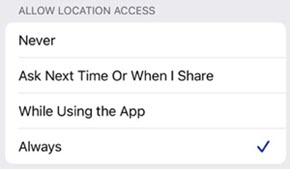
On iPhone, the insured is sometimes prompted after a certain amount of time to make sure that they want the app to be accessing their location. If they select Change to Only While Using instead of Always Allow, they will receive this error message in the app.

To fix the error:
 
  1. On the Error screen in the TrueLane app, tap Go to Settings.
  2. Tap Location.
  3. Tap Always to select it. The selected option will have a check mark next to it.
error 1


When I open the app, it says, “TrueLane requires your location all the time.”

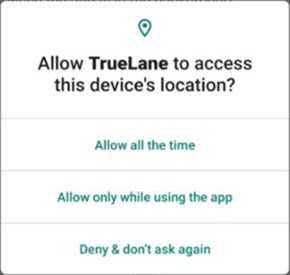
On Android, this message will appear if the insured removed permission for TrueLane to access their location or set it to only allow while using the app.

To fix the error:
 
  1. On the Error screen in the TrueLane app, tap Got it!
  2. Tap Allow all the time.
error 2


When I open the app, it says, “TrueLane requires your activity permissions.”

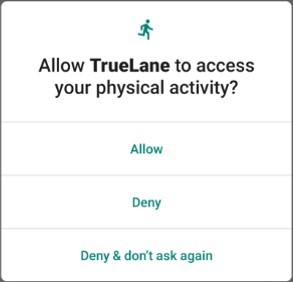
On Android, this message would appear if the insured removed permission for TrueLane to access Physical Activity.
 
To fix the error:
 
  1. On the Error screen in the TrueLane app, tap Got it!
  2. Tap Allow.
error 3


Frequently Asked Questions

Top frequently asked questions about TrueLane:
 

How does the TrueLane program work?

  1. Have a policy with TrueLane. When you add TrueLane within 60 days to your new business policy you’ll receive a discount of up to 15%.^
  2. Download the TrueLane app: You’ll receive a text with the link to download the free app for either Apple iOS or Android.
  3. Complete the activation process: Register the app by filling in your information and enabling a few permissions, then take your first drive. Each participating driver must complete activation and take their first drive within 30 days of policy effective date to keep their discount.
  4. Enjoy the ride: Remember to take your smartphone with you each time you drive. The TrueLane app runs automatically during each trip to help you stay focused on driving.
  5. Renew: You can save up to 40%^ when you renew based on the safe driving habits you demonstrate throughout your policy term. Riskier habits may result in a higher premium.^

How does TrueLane scoring work?

The TrueLane app collects data using sensors in your smartphone, just like other navigation apps. Then, it scores your driving based on five key behaviors:
 
  • Phone distractions: The phone is on, unlocked, and is being physically moved or touched while the vehicle is in motion. Driving requires your full attention. Taking your eyes off the road for 5 seconds at 55 mph is like driving with your eyes closed for the length of a football field.
  • Speeding: When you speed, you have less time to react to unexpected situations on the road. TrueLane compares your driving speed to the posted speed limit, plus a buffer depending on the road.
  • Braking: TrueLane uses GPS data to calculate sudden changes in speed. Speeding up and braking smoothly give you more time to react to your surroundings. Plus, it reduces wear on your vehicle.
  • Road type: TrueLane pays attention to the kind of roads you drive on. The app is smart enough to know that different types of roads may require different driving behaviors, and it factors that into your score.
TrueLane scores your driving over time based on the average of your driving habits. Don’t worry about a one-time incident ruining your score – safe driving consistency is more important. Log in to the TrueLane app to get your current score, review or edit your recent trips, and get personalized tips to help improve your score. The app will also tell you how your driving is changing your premium cost.

How is my initial discount determined?

When you add TrueLane within 60 days to your new business policy you’ll receive a discount of up to 15%.^ Download and activate the app within 30 days of your policy effective date to keep this discount.

Will my pricing related to TrueLane ever change as a result of my score?

Yes. Your price will change based on your driving habits at each renewal. 

How is my renewal pricing for TrueLane determined?

You can earn up to a 40%^ discount based on your driving habits at each renewal. Riskier habits may result in a higher premium.^

What happens if I stop using TrueLane?

TrueLane is a continuous program. Once you start the app and turn on the permissions, it’ll continue running in the background to track your driving habits. If you decide the app isn’t for you, you will be removed from the program. However, if we don’t get your driving data for 45 days in a row, you’ll be unenrolled and lose your sign-up discount.

What if I get a new smartphone?

If you replace your smartphone you will need to download and activate the app again to continue receiving your discount.
 
Tip: After your first drive with the app on the new device, open the app and check your Latest Trips. If everything is working properly the trip will appear on the list.

Read our full list of FAQs below for more information.


Terms and Conditions

Manage Your Policy Online

To manage your policy, check your TrueLane discount or get policy documents, log into My Account online.


Contact Us

To chat with an online customer service representative, log into My Account then click or tap the chat icon in the lower right to get started.
 
To speak with TrueLane Technical Support call 1-800-300-6449.


Last Updated: April 2025
 
^ Not available in all states, terms and conditions apply.
Summaries of coverages and policy features are for informational purposes only. In the event of loss, the actual terms and conditions set forth in your policy will determine your coverage.
 
AARP and its affiliates are not insurers. Paid endorsement. The Hartford pays royalty fees to AARP for the use of its intellectual property. These fees are used for the general purposes of AARP. AARP membership is required for Program eligibility in most states.
 
The AARP Auto Insurance Program from The Hartford is underwritten by Hartford Fire Insurance Company and its affiliates, One Hartford Plaza, Hartford, CT 06155. It is underwritten in AZ, MI and MN by Hartford Insurance Company of the Southeast; in CA, by Hartford Underwriters Insurance Company; in WA, by Hartford Casualty Insurance Company; in MA, by Trumbull Insurance Company; and in PA, by Nutmeg Insurance Company and Twin City Fire Insurance Company. The AARP Home Insurance Program from The Hartford is underwritten by Hartford Fire Insurance Company and its affiliates, One Hartford Plaza, Hartford, CT 06155. It is underwritten in AZ, MI and MN by Hartford Insurance Company of the Southeast; in CA by Property and Casualty Insurance Company of Hartford; in WA, by Trumbull Insurance Company; in MA, by Trumbull Insurance Company, Sentinel Insurance Company, Hartford Insurance Company of the Midwest, and Hartford Accident and Indemnity Company; and in PA, by Nutmeg Insurance Company. The Hartford does not write new Home business in all areas, including the states of CA and FL. Savings, benefits and coverages may vary and some applicants may not qualify. The Program is currently unavailable in Canada and U.S. Territories or possessions.
 
1 In Texas, the Auto Program is underwritten by Redpoint County Mutual Insurance Company through Hartford of the Southeast General Agency, Inc. Hartford Fire Insurance Company and its affiliates are not financially responsible for insurance products underwritten and issued by Redpoint County Mutual Insurance Company. The Home Program is underwritten by Hartford Insurance Company of the Southeast.
 
* Customer reviews are collected and tabulated by The Hartford and not representative of all customers.